











Sequence Wiz electronic health records system for yoga therapists

Step 1: Put your stamp on it

Put your stamp on it

Activate student portals

Set up scheduling

Make your forms

Get to know your student

Create effective practices

Record student’s journey

Deepen your expertise

Make it yours. Add your name, logo, studio address, and contact details to your Sequence Wiz profile, and they’ll automatically show up everywhere your work reaches clients — your student portal, intake forms, sequence handouts, and emails. Set it once here, and your branding travels with everything you send out, so every touchpoint looks like it came from you and not from a generic template.

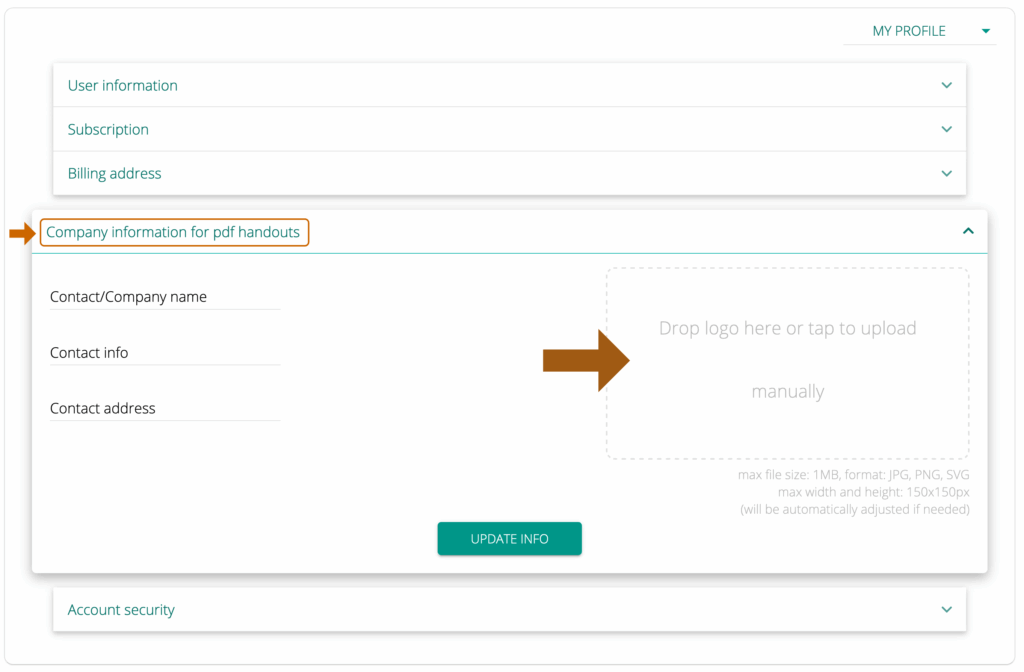
To add a logo and/or any other business/personal information to your account, go to MY ACCOUNT > MY PROFILE. Select the fourth tab Company branding, enter your name or the name of your company, contact information, and contact address. None of those fields are required. You can also drag your logo into the image window to add your logo. Please keep the file size under 1MB. Click UPDATE INFO. You are done!

Add your personal branding

Do you need any help?

Visit out HELP SITE to find answers to all your question or fill out the contact form on the site to get help.